Foundation · styles/nf/
The design system of nfrancois.fr.
The colors, typefaces, and components of the site. Everything on this page is rendered by the site’s real CSS, and the values are read from its files when the site is built.
Principles
01
Four rules hold it all together. They come from my brand guide, the same for the site, talks, and documents.
- Three colors and some graysPaper, ink, and yellow. Screenshots, photos, and logos bring the rest of the color.
- Yellow is rareOne use per screen: a highlighted word, the key value in a chart, or a solid block. Never yellow text on a light background.
- Rules and bands, not shadowsA thin rule separates rows and an ink band sets the page’s rhythm. The structure shows, with no depth effects.
- Light first, dark by choiceThe site always opens in light mode. Dark mode applies when visitors choose it, and the choice is remembered.
Kept to one place
- Yellow: one use per screen, a highlighted word, a key value, or a solid block.
- Dark mode: a button in the footer, and at the bottom of the menu on mobile. The site always opens in light mode.
- The angled arrow: only on a link that leaves the site.
- The terminal prompt and the grid paper: only in the Lab.
- Very large numbers: only on the home page.
What the site guarantees
- A visible outline on every element reached with the keyboard.
- Animations turned off when the device asks for reduced motion.
- Body and secondary text above a 4.5:1 contrast ratio, in both themes (measured below).
- Animated counters written into the page, readable without JavaScript and by search engines.
- The theme set before the page shows, with no flash.
- Cookie-free analytics (Plausible).
Colors
02
Each color is shown in both themes, light on the left and dark on the right. Contrast ratios are measured against the paper of the same theme, with WCAG thresholds: 4.5:1 for text, 3:1 for a rule or a field.
Backgrounds and surfaces
The page paper, the lighter paper of cards, the row hover.
--papierLight#F6F4EFDark#141413--papier-clairLight#FBFAF7Dark#1E1E1C--survolLight#EDEAE3Dark#282825
Text
Ink for text, gray for secondary text and metadata.
--encreLight#1A1A1A15.8:1 · AADark#F6F4EF16.8:1 · AA--grisLight#6B69645.0:1 · AADark#A8A59E7.5:1 · AA
Rules and strokes
Light gray for thin rules, mid gray for secondary bars, the stroke of form fields.
--gris-clairLight#D9D6CE1.3:1 · decorativeDark#34332F1.5:1 · decorative--gris-moyenLight#8E8A823.1:1 · 3:1Dark#74716A3.8:1 · 3:1--trait-champLight#8A87813.3:1 · 3:1Dark#807D764.5:1 · 3:1
Yellow
The only bright color, and the ink written on it.
--jauneLight#FFD84DDark#FFD84D--on-jauneLight#1A1A1A12.6:1 · AADark#1A1A1A12.6:1 · AA
States
For forms only: an error, a successful submission.
--erreurLight#A3261B6.7:1 · AADark#E8705F6.1:1 · AA--succesLight#2E6B3F5.8:1 · AADark#6FBF868.3:1 · AA
Typography
03
Hanken Grotesk for headings and numbers, Familjen Grotesk for text, JetBrains Mono for dates, sources, and markers. Three open-source typefaces, served by the site.
- AaHanken Grotesk
--font-display · 800 and 900 - AaFamiljen Grotesk
--font-sans · 400 to 700 - AaJetBrains Mono
--font-mono · 500, uppercase
- Home page heading
.nf-hero__title · clamp(40px, 7.2vw, 88px) · 800 What AI is changing
- Page heading
.page-title · clamp(40px, 6.2vw, 76px) · 800 What I build
- Section heading, home
.accueil-titre · clamp(36px, 4.4vw, 56px) · 800 Who I am
- Section heading
.nf-section__name · clamp(32px, 4.4vw, 56px) · 800 Talks
- Lead
.page-lead · 22px · 400 An introduction in one or two sentences.
- Text
body · 18px · 400 Body text, at most 680 px wide, to keep lines easy to read.
- Label
.nf-label · 14px · 500 My approach
- Marker
.nf-fiche__date · 12px · 500 October 13, 2026
- Number
.nf-chiffre · clamp(48px, 6vw, 72px) · 900 3,000+
Shapes and motion
04
A single subtle radius, pills for what you click, a fixed column, and two curves for everything that moves.
--rayon 6pxPhotos, cards, screenshots, code blocks.--radius-full 999pxButtons, filters, labels: fully rounded.--container 1200pxColumn width.--measure 680pxBody text width.--rule-strong 2pxInk rule that opens a section.--rule-thin 1pxGray rule between rows.
Spacing
--space-14px--space-28px--space-312px--space-416px--space-624px--space-832px--space-1248px--space-1664px--space-2496px--space-32128px
--sortie-douce cubic-bezier(.2, .7, .2, 1)Starts fast, lands softly: hovers, highlights, menus.--entree-sortie cubic-bezier(.65, 0, .35, 1)For what crosses: the yellow fill of the primary button.--duree-courte 160msHovers and state changes.--duree-moyenne 320msUnderlines and highlights that draw themselves.--duree-longue 640msChart bars and reveals.
Effects
- Scroll revealsBlocks rise as they appear, lists arrive in sequence. Pure CSS (animation-timeline: view()), no script.
- HoversA row slides 8 px to the right. Large cards stay still: their border turns ink.
- “Live” dotA subtle green pulse around the dot of a live experiment.
- CounterNumbers count up once to their value, which is written into the page.
Icons and logos
05
The site’s icons come from Phosphor, Bold weight, in a single color and always next to text. The logos of the Lab’s tools are single-color too, to stay on brand in light and dark modes.
Site icons
- Moon
- Sun
- Menu
- Close
- External link
- RSS feed
- Copy link
- Copy
- Copied
Tool logos
- Vercel
- Supabase
- Neon
- Cloudflare
- Claude
- Claude Code
- Google Cloud
- Google Search Console
- Plausible
- Hostinger
- GitHub
- Gemini
- Mistral
- Mistral Vibe
Paths from Simple Icons (CC0 license). No open logo for ChatGPT, Google AI Studio, or Wispr Flow.
Components
06
The site’s classes, for real. Each snippet can be pasted as is into a page of the site.
Buttons
.nf-btn --primaire --secondaire --petitOn hover, a yellow fill rises in the primary button. An arrow only when the link leaves the site; when a whole list leaves the site, its source says so once, above it.
<a class="nf-btn nf-btn--primaire" href="…"><span class="nf-btn__lbl">Primary action</span></a>
<a class="nf-btn nf-btn--secondaire" href="…">Secondary action</a>
<a class="nf-btn nf-btn--primaire nf-btn--petit" href="…"><span class="nf-btn__lbl">Small</span></a>
Link
.nf-linkOn hover, the underline redraws itself in yellow.
<a class="nf-link" href="…">Read the lab note</a>Highlight
.nf-hl1 to 4 words, on text at least 24 px, once per screen. In dark mode, the words turn yellow.
What I test with AI
<h1>What I <span class="nf-hl">test with AI</span></h1>Labels
.nf-label .lab-etiquette .article__etiquette<p class="nf-label">My approach</p>
<p class="lab-etiquette">AI · Data · Prototypes</p>
<span class="article__etiquette">Behind the scenes</span>Numbers
.nf-preuve .accueil-chiffresVery large on ink, on the home page only. They count up once to their value.
20 yearsin digital
3,000+newsletter subscribers
<div class="nf-preuve accueil-chiffres">
  <p><span class="nf-preuve__n">3,000+</span><span class="nf-preuve__l">newsletter subscribers</span></p>
</div>
Bar chart
.nf-bars .nf-bar--cleA single key value in yellow, the others in mid gray.
<div class="nf-bars">
  <div class="nf-bar nf-bar--cle">
    <span class="nf-bar__label">Writing</span><span class="nf-bar__val">64%</span>
    <span class="nf-bar__track"><span class="nf-bar__fill" style="width: 64%"></span></span>
  </div>
</div>
List row
.nf-fiches .nf-ficheTalks, lab notes: date and type, title and summary, arrow.
<ul class="nf-fiches"><li><a class="nf-fiche" href="…">
  <span class="fiche__quand"><span class="nf-fiche__date">October 13, 2026</span><span class="fiche__type">Behind the scenes</span></span>
  <span><h3 class="nf-fiche__title">Turning an Excel spreadsheet into a web calculator</h3><p class="nf-fiche__meta">The summary, in one or two lines.</p></span>
</a></li></ul>
Lab markers
.projet__repere .projet__statut--… .article__etiquetteAn experiment has a status (where it stands) and a kind (what it is). A note has a type: what it tells.
EXP 04PrototypeAgent
EXP 03LiveTool
EXP 02StoppedSite
EXP 01LiveApp
- Status
- PrototypeLiveStopped
- Kind
- SiteToolAppAgent
- Note type
<p class="projet__repere">
  <span class="projet__numero">EXP 02</span>
  <span class="projet__statut projet__statut--en-ligne">Live</span>
  <span>Tool</span>
</p>
<span class="article__etiquette">behind the scenes</span>
Ink band
.bande .nf-darkOne per key moment, full width: it sets the page’s rhythm. The contact band (components/BandeContact.tsx) closes the main pages.
IA, Tech & Travel Café
<div class="bande nf-dark accueil-bande">
  <section class="nf-section">
    <h2 class="accueil-titre">IA, Tech & Travel Café</h2>
  </section>
</div>
Experiment sheet
.fiche-labo .projet__texteOn the Lab card and at the top of the lab note that tells the experiment (components/FicheExperience.tsx).
Note contents
.sommaire .copierSticky in the right column on wide screens: the section being read turns ink. “Copy link” is a quiet gray command, like every copy button on the site (components/BoutonCopier.tsx).
In this note
Signature
.auteurAt the end of each note: who ran the experiment, unframed, under a thin rule.
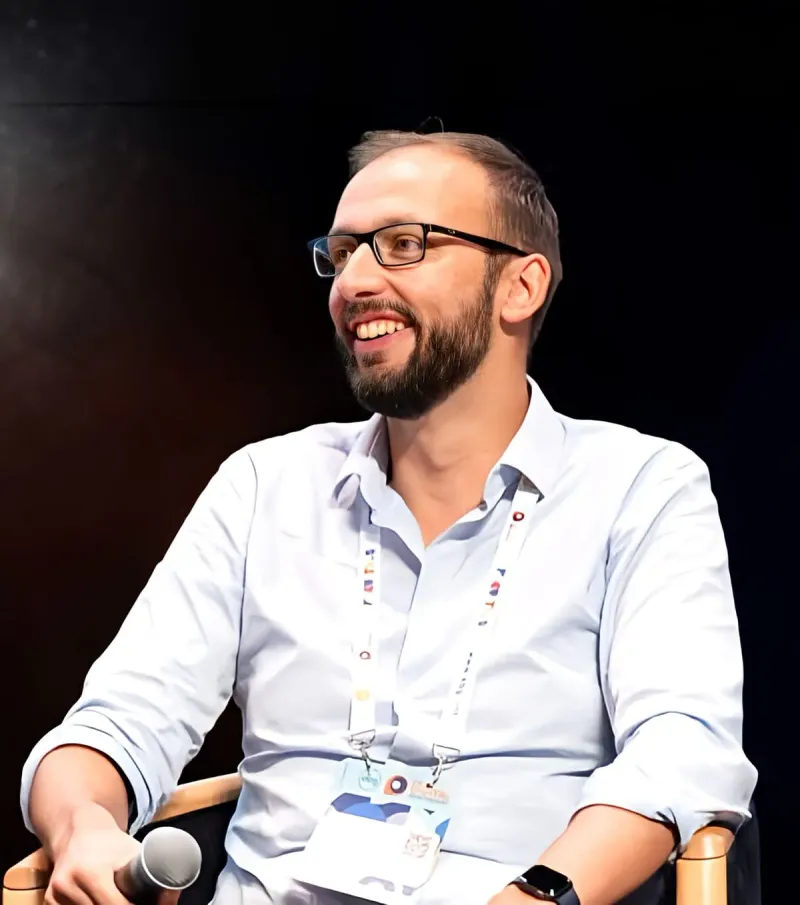
Experiment by
Nicolas François
I’ve worked in digital for over 20 years. I also write IA, Tech & Travel Café, a French-language newsletter on AI in tourism.
Log
.journal__liste .journal__ligneGit log style, on ink: only changes that matter to a visitor (content/journal.ts).
6921d7a2e84d49
Terminal prompt
.inviteAt the top of the Lab only: the command types itself, then the cursor blinks.
nicolas@lab ~ % ls ./experiments
Verbs on ink
.bande .verbes .verbe .verbe__preuveAbout page: one verb per column, always smaller than the section title, texts of the same length, and the proof under a rule, aligned across columns.
I test.
Before I talk about a tool, I use it. I also run my own experiments with AI.
MIT-certified in agentic AI
Feedback carousel
.carrousel .temoignages .temoignageAbout page: the quote in the heading font, the author in small caps (“First L. · what they do”, no organization name), with no date or place. No frame, a rule above; the quote cut off on the right fades out. Real feedback comes from the database, never from the repo.
“The quote, large, in the heading font.”
First L. · What they do
“A second quote, to show the gap between two.”
First L. · What they do
Career row
.parcours .parcours__ligneAbout page: the period on the left, the role in large type, the organization in small caps, one gray sentence, and the job keywords on the right.
Since 2024
Founder and writer
IA, Tech & Travel Café
A monthly newsletter on AI in tourism and travel.
Tool testing, analysis, interviews
Awards
.distinctions .distinctionAbout page: no cards, the name under a strong rule, smaller than the section title.
Certification · 2025
MIT Professional Education
Agentic AI Applied to Enterprise Transformation
Award · Explore Grand Est
UX Awards
“Digital Experience, Public sector” category
Bio to copy
.bio .copierAbout page: the short and long bios, each with its copy button (the same gray as “Copy link”).
Short bio · 60 words
Nicolas François tests and analyzes AI for tourism and travel professionals.
Light / dark toggle
[data-theme-bouton] .theme--piedIn the footer of every page, and at the bottom of the menu on mobile. Try it: it switches the whole page.
Logo
07
The NF stamp: the N and the bar of the F drawn as a single line of ink, then the dot. In the top bar, it animates by drawing itself.
On paper
On ink
On yellow, always in ink: the solid block of the site icon